
Overview
The AI Usage page is found under Settings > Super Admin > AI Usage. It gives a full breakdown of how AI features are being used across your practice for any billing cycle. You can use it to monitor audio recording time, token consumption, and estimated overage charges, and to see which staff members are using AI and how much.
Only users with Super Admin permission can view this page.
Billing Cycle Selector
The page opens on the current billing cycle. Use the cycle selector at the top to switch to a previous cycle and review historical usage. Cycles are listed by their start date and correspond to your subscription billing period. Cycles that have no AI activity at all do not appear in the selector, but the current cycle is always shown even if no AI has been used yet this month.
Summary Figures
Four summary figures appear at the top of the page.
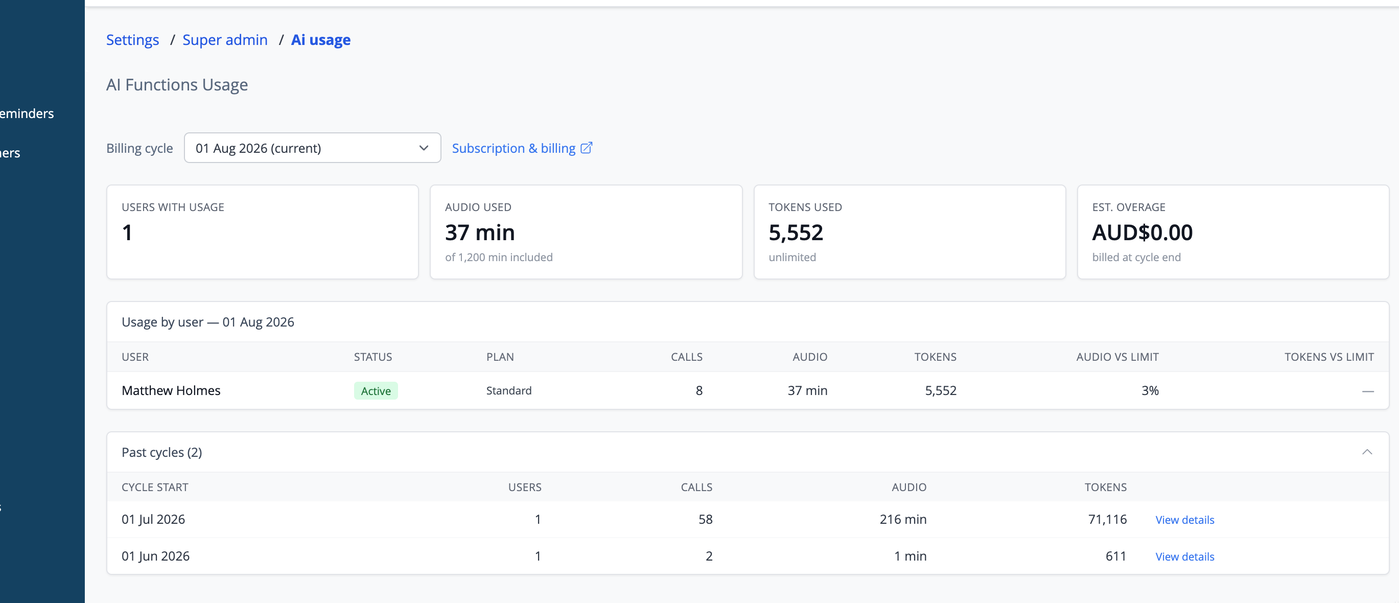
Users with usage shows the number of distinct staff accounts that have used an AI feature during the selected cycle. Audio used shows the total recording time consumed across all users in that cycle, expressed in minutes. Tokens used shows the total number of AI language model tokens consumed, which correspond to the volume of text processed during transcription formatting and letter generation. Estimated overage shows the additional amount that may be charged if your plan has included limits that have been exceeded.
The included minutes and included tokens figures shown alongside the summaries come from your subscription plan. If your plan has no hard limits on these, the overage figure will always be zero.
Per-User Breakdown
The table below the summary figures shows one row per staff member who has used AI during the selected cycle. Each row shows the user's name, their current active status, their audio usage in minutes, their token usage, and a breakdown by feature showing how many transcription sessions and letter generations they have used.
Users who have been deactivated since the cycle recorded are marked as inactive. Their usage still counts toward the total.
Cycle History
Below the per-user table is a summary of all previous cycles that have AI usage logged. Each row shows the cycle start date, how many distinct users were active, the total number of AI calls, total audio, and total tokens. This gives a quick view of how AI usage has grown or changed month to month.
The current selected cycle does not appear in the history table — it is shown in the summary and per-user sections above.
Common Questions
Why does the current cycle show zero usage even though I know AI has been used?
Usage is recorded at the point the AI call completes. If a transcription session was started but the recording was discarded without being submitted, no usage is recorded for that session. Audio usage for transcription is recorded as soon as the recording is stopped, regardless of whether the formatted note is accepted.
Does the page update in real time?
The page refreshes each time you load it or switch cycles. It does not update automatically while you are viewing it. Reload the page to see the latest figures.
Tokens are the units the AI language model uses to process text. Roughly speaking, one token is about four characters or three-quarters of a word. A typical transcription formatting call uses a few hundred to a few thousand tokens depending on the length of the consultation. Letter generation uses a similar range. You do not need to manage tokens directly — they are tracked automatically and the summary gives you a plain-language view of consumption.